

You Use Five AI Tools. None of Them Talk to Each Other.
You brainstorm in ChatGPT. You research in Gemini. You build in Claude Code and Cursor. You reason with DeepSeek or Kimi. Every tool is brilliant in isolation.
But the breakthrough from Tuesday’s ChatGPT session? Gone when you open Cursor on Wednesday. The architecture decision you made in Claude Code last month? You’re explaining it again from scratch.
Your knowledge is scattered across a dozen tools, each starting from zero.
We built Nowledge Mem to fix this: a neutral, trustworthy, completely local memory layer that sits between you and every AI tool you use. Since our first release, Mem has been quietly collecting the valuable context that flows through your daily work, study, and creation.
v0.6 is the release where Mem stops waiting and starts contributing before you ask.
Background Intelligence
Before v0.6, Mem was a faithful collector. It stored everything you gave it, but the work of connecting, synthesizing, and making sense of your knowledge was yours.
Now Mem does that work while you sleep.
Every morning, you wake up to a briefing. What changed in your knowledge overnight. What patterns are emerging. What needs your attention. It’s written to ~/ai-now/memory.md, a plain file any AI agent reads at session start. Your Claude Code session, your Cursor project, your OpenClaw agent, they all begin the day knowing what you know.
Your memories evolve. When you capture a new thought about database architecture, Mem doesn’t just file it. It finds your previous thoughts on the same topic and asks: does this replace the old thinking? Enrich it? Confirm it from a different source? Or contradict it? Over time, your knowledge isn’t a pile of notes. It’s a versioned history of how your thinking changed.
Crystals form. When several memories converge around the same topic, Mem synthesizes them into a single, high-quality reference: a Crystal. Think of it as the system reading five of your scattered notes about authentication and writing the definitive summary, with every claim traceable to its source.
Insights surface connections you missed. Mem looks across domains: your frontend decisions, your database research, your API design notes. When it finds a non-obvious connection or a forgotten decision that matters again, it tells you with the actual content: “Your October caching strategy contradicts the March assessment. Here’s both sides.”
Flags catch problems. Contradictions, stale information, claims that need verification. Mem marks them for your review, with conflicting content shown side by side. You decide what to keep.
All of this runs quietly on your machine. You choose which tasks to enable. No cloud processing. No data leaving your device. Advanced Features docs
The Timeline
The main interface of v0.6 is a single, infinite stream where everything happens.
No menus. No forms. Just type. Drop a thought, ask a question, paste a URL, attach a file. Mem figures out what you mean.
-
“The API should use JWT tokens, not session cookies. We decided this after the security review.” Saved as a decision, linked to your existing API memories, detected as enriching your previous auth notes.
-
“What are my main knowledge themes?” Mem queries your graph, finds topic clusters, and tells you.
-
“https://arxiv.org/abs/2401.12345” Mem reads the page, summarizes it, saves the knowledge. One URL, zero effort.
-
“Which of my ideas have evolved the most?” Mem traces evolution chains across your memories and shows the richest histories.
-
“Show my working memory.” Your morning briefing, right here.
Think of it as texting your Pensieve. Everything you say becomes part of your knowledge. Everything you ask draws from your entire history. And between your messages, the Timeline shows what Mem has been doing in the background: crystals formed, insights found, flags raised.
Select any item, and a context panel appears with related memories and actions you can take. A live knowledge graph renders alongside it, showing how the selected memory connects to the rest of your knowledge. As you type a new thought, the graph updates in real time, showing you what it relates to before you even finish.
Connecting the Dots
Exchange v2: 13+ AI Platforms
We rewrote the browser extension from scratch.
It now connects to 13+ AI platforms: Claude, ChatGPT, Gemini, DeepSeek, Kimi, Qwen, ChatGLM, MiniMax, Perplexity, Poe, Grok, Manus, and Open WebUI. Every conversation, across every tool, feeds into one memory.
The real change is Smart Distill. Instead of blindly saving entire conversations, Mem evaluates each turn and decides what’s worth remembering. A breakthrough insight gets saved. Small talk gets skipped. You choose the LLM provider (OpenAI, Anthropic, Gemini, xAI, OpenRouter, Ollama, GitHub Copilot, or any custom endpoint), and the extension works autonomously.
For those who want everything: automatic thread backup with incremental sync and deduplication is built in. Nothing is ever lost.
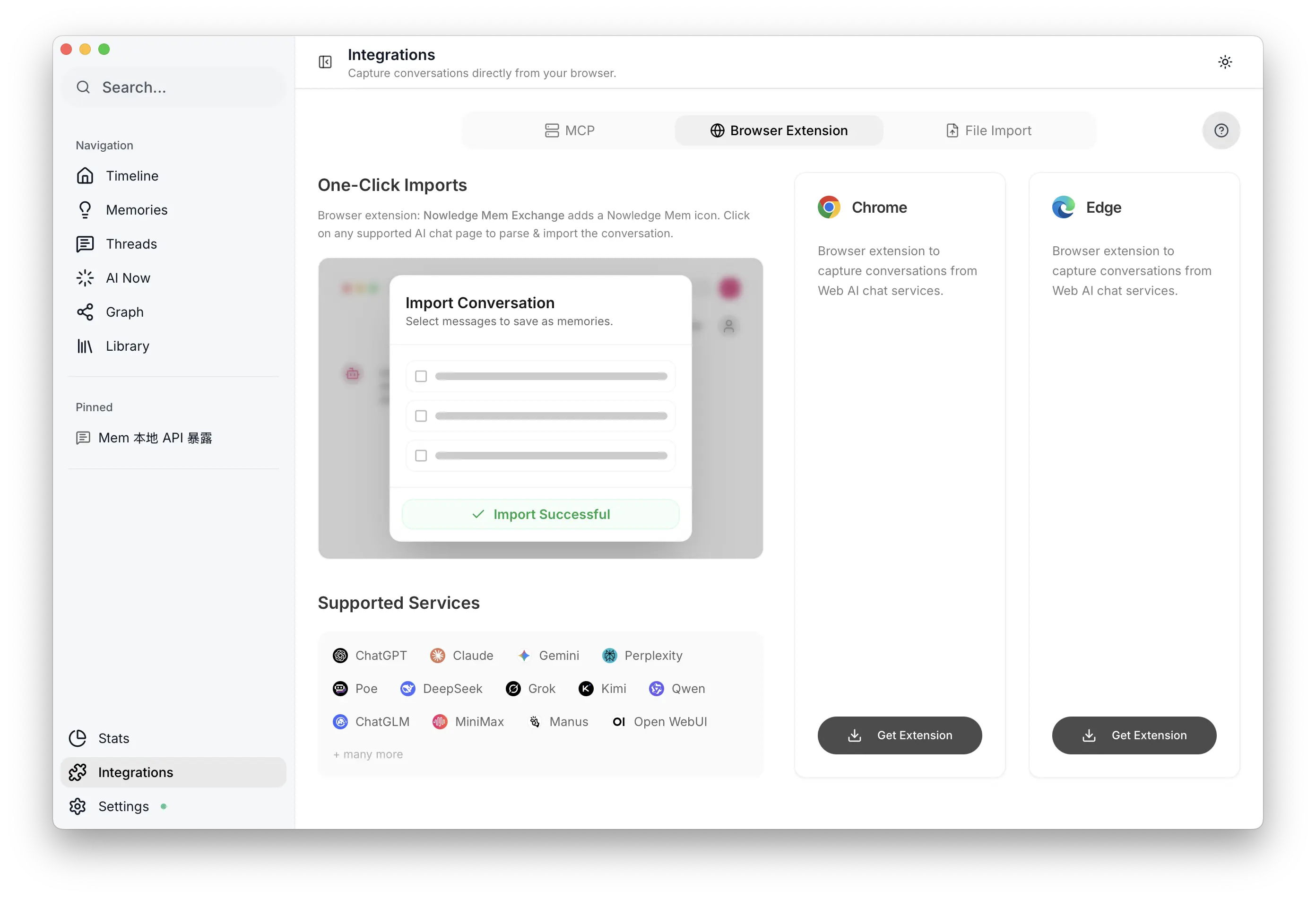 Exchange: Proactive capture settings
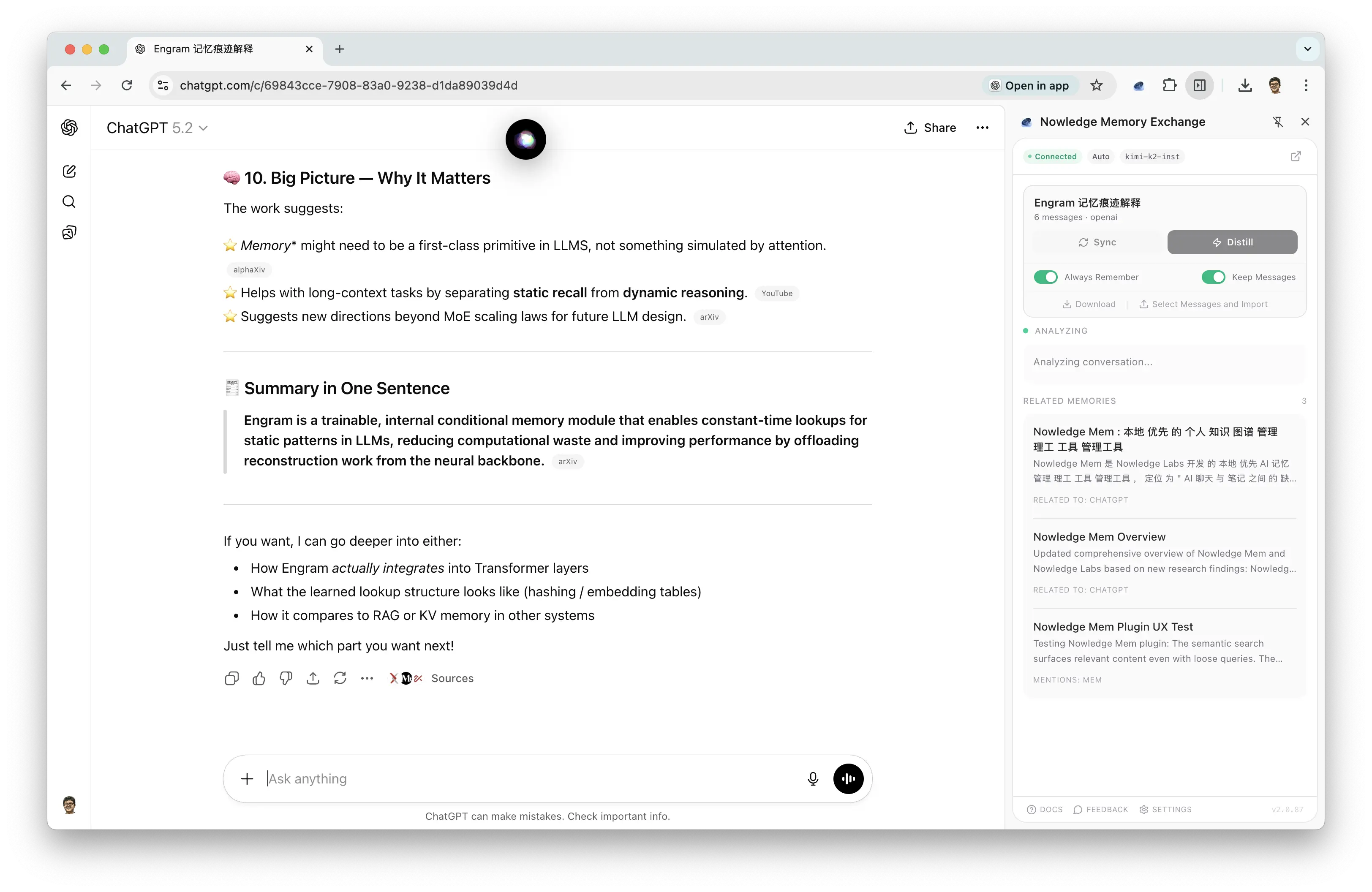 Exchange: Smart Distill trigger
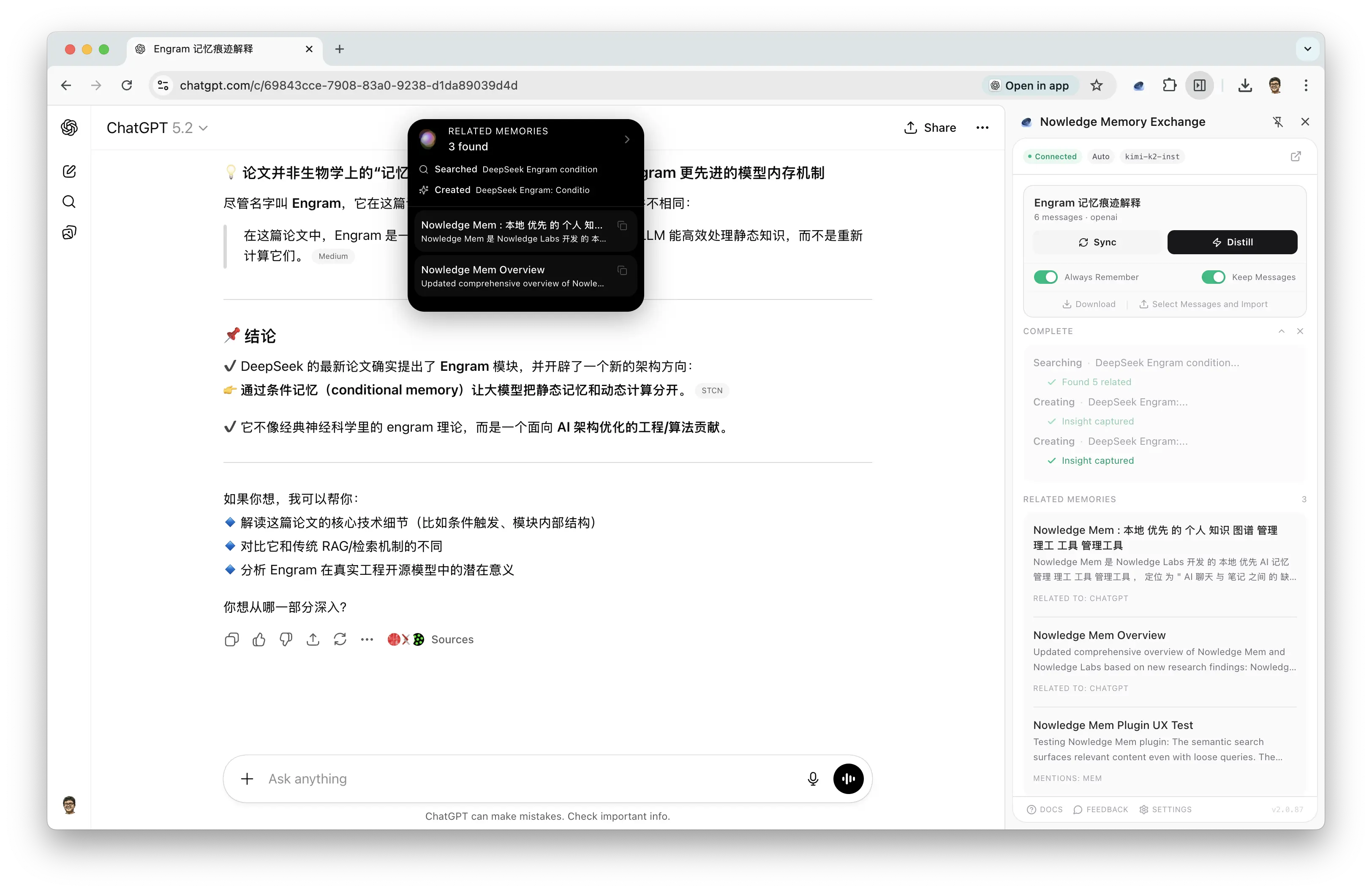 Exchange: Capture result
Agent Conversation Auto-Sync
Your coding agents generate enormous context: architecture decisions, debugging breakthroughs, implementation rationale. Most of it evaporates when the session ends.
v0.6 adds auto-sync for Claude Code, Cursor, Codex, and OpenCode. Configure which projects to watch, and Mem imports sessions automatically. Preview before import, or export any session as Markdown. Integrations docs
Browse-Now: Your Browser, Under Agent Control
Most AI tools that “browse the web” launch a blank browser. No login sessions. No cookies. No access to anything real.
Browse-Now controls your actual Chrome, the one where you’re already logged in. Your agents can navigate, click, fill forms, take screenshots, all with 99%+ reliable element targeting:
browse-now open "https://booking.com/my-reservations"
browse-now snapshot
browse-now click @e3
browse-now fill @e5 "2026-03-15"
Exposed as both a CLI and as skills any agent can use. It’s also how Mem reads URLs for the Library.
Library
Sometimes you need Mem to deeply understand a document, not just a quick note about it.
Drop a PDF, DOCX, PPTX, or Markdown file into the Timeline, or upload in the Library view. Mem parses the document, segments it intelligently, indexes every section, and makes it searchable alongside your memories.
Then ask: “What does my architecture doc say about caching?” Mem finds the relevant sections and answers with citations.
Upload a new version, and Mem detects the changes, keeping your knowledge current without manual cleanup. Library docs
A New Search Engine
In previous versions, Mem ran search through the graph database: vector matching, full-text search, and relationship traversal all in one system. It worked, but a graph database is built for relationships, not text retrieval. We hit ceilings: limited tokenizer support for Chinese and Japanese, no proper BM25 ranking, embedding models capped at 384 dimensions.
For v0.6, we separated concerns. A dedicated search engine (LanceDB) handles everything text and vector. The graph database does what it does best: relationships and algorithms.
The result:
- Hybrid search. Every query runs semantic vector matching and BM25 keyword search in parallel, fused via Reciprocal Rank Fusion. You find memories by meaning and exact terms simultaneously.
- Higher-fidelity embeddings. Upgraded from 384 to 1024 dimensions (Qwen3-Embedding on macOS, BGE-M3 on Windows/Linux). Dramatically better precision.
- Native CJK support. Proper tokenizers for Chinese. Searching in your own language finally works.
- AI reranking. In Deep Mode, an LLM evaluates top results and explains why each one is relevant. Not just a score, but a reason.
- 50% faster. Deep Search dropped from ~35 seconds to ~15.
We wrote about the foundations of our scoring pipeline, memory decay, and temporal understanding in How We Taught Nowledge Mem to Forget. v0.6 builds on all of that with a purpose-built search backend. Search & Relevance docs
How Knowledge Lives in Mem
The knowledge graph in v0.6 is fundamentally different from before. We went back to cognitive science, specifically how human memory transforms over time from raw experience to lasting understanding, and designed the graph model to mirror that.
Traces are the raw records. Full conversation threads, uploaded documents, browser captures. High fidelity, high volume. Nothing is lost.
Units are the extracted knowledge. Individual facts, decisions, plans, learnings, each classified into one of eight types. A single conversation thread might yield a dozen units, each standing on its own but linked to its source for provenance.
Crystals are the synthesis. When multiple units converge, the system distills them into a single, context-independent reference. A Crystal from five sources isn’t a summary. It’s the consolidated understanding, with every claim traceable to its origin.
The connective tissue is the EVOLVES relationship: a unified model that captures how any two memories relate. Every link carries a content relation (replaces, enriches, confirms, or challenges) and an optional workflow progression marker. These four relations are exhaustive: given two related memories on the same topic, the newer one must do one of these four things to the older one.
This isn’t abstract taxonomy. When Mem tells you “your database architecture thinking evolved across 6 memories from March to October,” it’s walking actual evolution chains, not running a keyword search.
On top of this, community detection automatically clusters related entities into topic groups, revealing expertise areas you never explicitly organized. And node importance scoring surfaces the most influential concepts in your graph, so the system knows which knowledge carries the most weight.
MCP: Your Full Graph, Inside Every Agent
MCP (Model Context Protocol) is the standard way AI agents connect to external tools. Mem has supported MCP since day one, but in previous versions it was basic: search memories, add a memory, list labels. The agent could read and write, but it couldn’t understand your knowledge.
v0.6 exposes 24 tools across the full knowledge surface. Your agent can walk EVOLVES chains to see how a decision changed over six months. It can list your crystals to find synthesized understanding. It can query topic communities to discover clusters of expertise. It can read your Working Memory to know what’s on your mind today. It can trigger knowledge graph extraction or community detection right from the chat.
And then there’s MCP Apps: interactive graph visualization that renders directly inside your MCP host. When your Claude Desktop agent calls explore_graph, it doesn’t return a list of IDs. It renders a live, interactive knowledge graph right in the conversation, nodes you can click, edges you can follow, your knowledge made visual without leaving the chat.
The same graph visualization powers the Timeline’s context panel, the Library’s source connections, and the dedicated Graph view in the Mem app. One graph engine, everywhere your knowledge lives. Usage docs
Access Mem Anywhere
Mem is local-first by design. Your knowledge lives on your machine, and we believe that’s the right default.
But local-first shouldn’t mean local-only.
v0.6 introduces Access Anywhere: a one-click secure tunnel powered by Cloudflare. Your Mem running on your Mac mini at home becomes accessible from your laptop at the office, your browser extension on a different machine, your OpenClaw agents on a remote server, or your nmem CLI from anywhere.
Two modes:
- Quick link. A random
*.trycloudflare.comURL. No account. One click. - Cloudflare account. A stable URL on your own domain for persistent access.
Every request requires your API key. The tunnel is under your control. No data routes through our servers. The local-first, privacy-first principle is preserved as Mem expands to more clients.
Update, March 2026. Access Anywhere now also powers Mem’s web client and mobile clients. The model is still the same: your Mem app remains the source of truth on your own machine, and web or mobile clients connect back to it through your tunnel rather than through our servers.
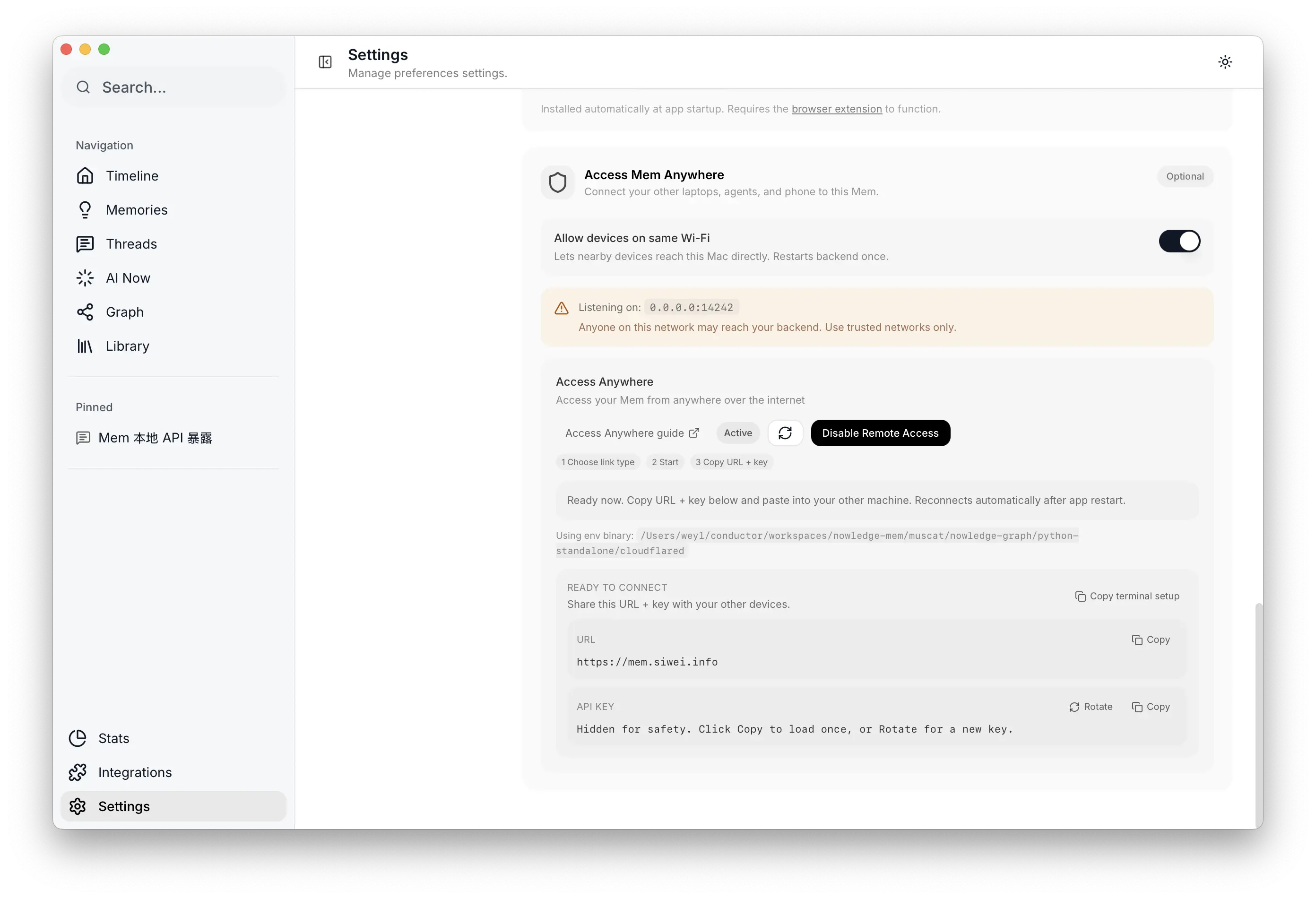 Access Mem Anywhere settings
Integrations
We built plugins for the tools where memory matters most:
- OpenClaw: Native memory for the OpenClaw agent framework. Agents share context across sessions without MCP overhead.
- Raycast: Search memories, save insights, read/edit Working Memory, all from ⌘ + Space.
- Alma Plugin: Memory integration inside Alma’s collaborative workspace.
- Claude Code v0.6: Injects Working Memory at session start. Prompts for checkpoint on context compaction.
- npx Skills: One-command install for any agent:
npx skills add nowledge-co/community/nowledge-mem-npx-skills. Four skills covering memory search, save, Working Memory, and graph exploration.
Linux headless deployment. Mem is a desktop app, but plenty of users want to run it on a home server, a VPS, or a CI machine with no display. So we rebuilt the entire control plane (configuration, tunnel management, agent scheduling, health monitoring) from UI into nmem CLI and TUI. You can now deploy Mem on a headless Linux box and manage everything from the terminal. Server deployment docs
The community has also built native support in DeepChat and LobeHub. Plus: a visual refresh (less color, no borders, content-first) and LLM-friendly docs at /llms-full.txt so agents can read our documentation natively. Community docs
Design Philosophy
We spent a long time on the principles behind v0.6. They’re worth sharing.
Every card must earn its space. If you wouldn’t miss it when it’s gone, it shouldn’t exist. An empty morning briefing means the system found nothing worth your time, and silence is the right answer.
Content speaks, labels don’t. “Your October database decision contradicts the March assessment” is useful. “Contradiction detected” is not. We show the what, never just the category.
Trust through transparency. Every insight shows its sources. Every crystal links to the memories it was synthesized from. Every flag shows conflicting content side by side. No black boxes.
Agency, not automation. Mem proposes. You decide. Every action is reversible. The system never silently merges, deletes, or modifies your knowledge.
Fewer, better. One insight that changes how you think is worth more than ten that state the obvious.
What’s Next
v0.6 is the foundation for something larger. Mem is becoming the neutral memory layer for the multi-agent era: a trusted place where knowledge accumulates, evolves, and remains available to any tool you choose to use.
One direction we’re especially excited about: GNN-based link prediction. Today, memory relationships are detected by embedding similarity and LLM classification, which works well but only catches connections the system explicitly evaluates. As your knowledge graph grows, a lightweight graph neural network trained on your own graph structure can predict likely connections the classifier missed, surfacing relationships that emerge from the shape of your knowledge, not just the text. The agent then validates these predictions with contextual judgment before surfacing them. The graph doesn’t just store your knowledge; it starts reasoning about it.
On our roadmap:
- Graph neural network link prediction for structure-aware relationship discovery
- Team memory for shared organizational knowledge
- Deeper agent integrations as the ecosystem grows
If you’re already using Mem, update to v0.6 from Settings. If you’re new, start here. For every detail, see the full changelog.
We’d love to hear what you think. Find us on X or GitHub.
Nowledge Mem is the memory layer for individuals and AI-native teams. Learn more or read the docs.