

Republication note: Republished with the author’s permission from the original post on abn.is, published 24 July 2026. Arun built the Google Antigravity plugin and donated it to Nowledge Labs, where it now lives at nowledge-co/nowledge-mem-google-antigravity. The technical content, headings, code, and screenshots are his. Nowledge Labs made four changes, none to the substance: the original’s opening says “we explain how we designed and built”, which under Arun’s byline on our own blog would read as though we built it, so it is “I explain how the plugin was designed and built” here; the original’s closing paragraph, which invites readers to contact Arun and points them to our posts, is omitted because that second pointer is circular here; the original’s callout boxes appear as blockquotes, which this blog renders instead; and the five diagrams are rendered inline from the original’s own Mermaid sources, so their labels sit in the page text rather than locked inside an image.
AI coding assistants are fast and capable, but out of the box every new conversation starts empty. Past bug fixes, architectural choices, domain-specific gotchas, and preferred workflows live only in your head or disappear into long chat logs.
Nowledge Mem fixes this by providing your AI agents with a persistent personal knowledge base (storing atomic memories, daily working memory briefings, standing rules, and executable skills with evidence tracing).
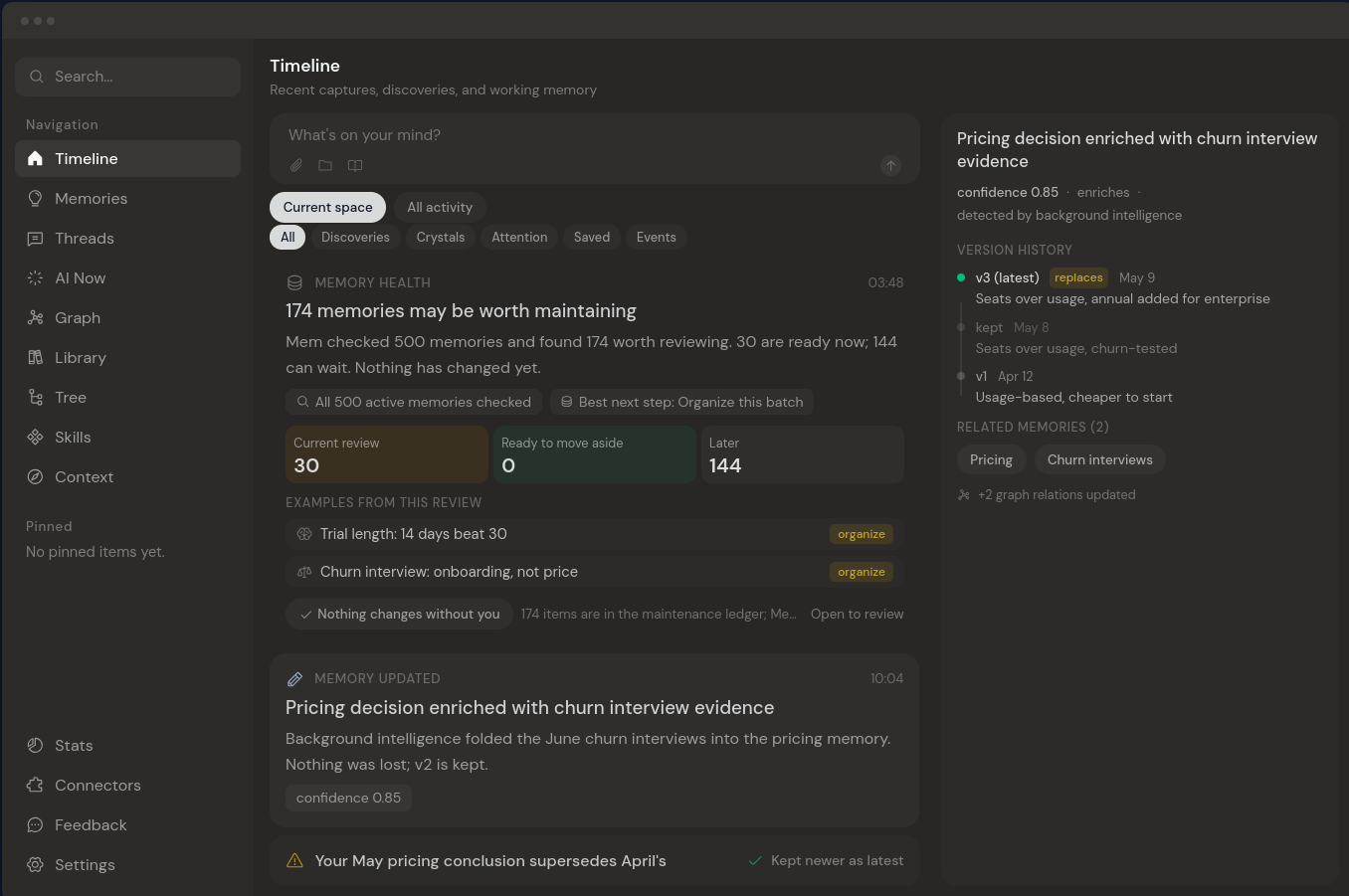 AI tools change. Your memory should compound: Mem carries conversations, decisions, and what your agents discover across tools. Every session builds on what came before and leaves the next one smarter.
With Google Antigravity 2.0, Google introduced a plugin architecture for agent customization. In this post, I explain how the nowledge-mem-google-antigravity plugin was designed and built: a hybrid integration focused on low latency, offline resilience, and developer control.
The plugin source lives at nowledge-co/nowledge-mem-google-antigravity.
1. What Nowledge Mem Brings to the Table
Nowledge Mem is an active personal knowledge engine for AI agents rather than a passive log store.
Key capabilities Nowledge Mem delivers:
- Situational Context Bundles: Compiles active initiatives, focus areas, and memory references into a startup briefing (
<nowledge_context_bundle>). - Standing Rules: Global and agent-specific behavioral constraints (security redaction, Flatpak D-Bus rules, code conventions) enforced automatically across sessions.
- Compiled Agent Skills: Repeatable procedures (
SKILL.mdbundles) compiled from real past work, verified against test cases, and assigned trust badges (Checked vs. Proven). - Nowledge FS (
mem_fs): A unified, path-first virtual filesystem (/memories,/threads,/wiki,/skills) for exploring knowledge trees cleanly.
Using local models for your knowledge embedding inferencing needs
Nowledge Mem supports local models out of the box. It supports both GPU and CPU bound embedding models as well as on device inferencing for background intelligence tasks.
I, personally, use Lemonade Server for managing local models with it also using my NPU for embedding. Nowledge Mem supports Lemonade as a first class LLM Provider.
2. The Google Antigravity 2.0 Plugin Architecture
Google Antigravity 2.0 defines plugins as namespaced packages that bundle all agent customization types into a single structure:
nowledge-mem-google-antigravity/
├── plugin.json       # Required manifest
├── mcp_config.json   # MCP Server definitions
├── hooks.json        # PreInvocation, PreToolUse, and Stop lifecycle hooks
├── rules/            # Always-on system rules
│   └── nowledge-mem.md
└── skills/           # Bundled agent skills
    ├── nmem-memory-search/
    ├── nmem-skill-load/
    └── nmem-thread-save/
When Antigravity starts, it scans two plugin locations:
- Workspace Level:
<workspace-root>/.agents/plugins/(project-specific). - Global Level:
~/.gemini/config/plugins/(available across all projects).
3. Key Design Decisions & Architectural Rationale
Connecting a local or remote knowledge base to an autonomous agent engine requires balancing three engineering constraints:
- Latency: Hook execution must complete in milliseconds without blocking the developer.
- Resilience: Network blips or sandboxed environment limits must never crash a session or lose data.
- UX Control: Developers should approve significant state changes without repetitive confirmation prompts.
Here is the technical rationale behind our core architectural decisions.
A. The 3 Startup Channels (Context Economics Rationale)
To eliminate cold starts without bloating model prompts, the plugin initializes Antigravity through three complementary channels:
Design Rationale (Context Slicing vs. Prompt Bloat)
Inlining an entire knowledge graph into system prompts causes severe context bloat and expensive KV cache penalties. By splitting startup knowledge into 3 distinct layers:
- Channel 1 (PreInvocation Hook) injects only today’s active briefing and direct memory links (
nowledgemem://memory/<id>).- Channel 2 (Always-On System Rules) sets persistent behavioral boundaries.
- Channel 3 (Available Skills Index) provides lightweight pointers, deferring full skill body retrieval until an active task explicitly requires it.
B. Tiered Transport Access (Performance & Sandboxing Rationale)
Spawning CLI subprocesses for background hooks adds 300 to 500ms of latency per invocation. To keep execution sub-30ms, we implemented a 3-tier hybrid transport hierarchy in hooks/nmem_shared.py:
Design Rationale (Tiered Access & Sandbox Security)
- Tier 1 (Native Python HTTP REST): Uses Python’s zero-dependency
urllib.requestto query/context,/working-memory, or/threads/importdirectly over HTTP (<30ms). For remote Mem endpoints,nmem_shared.pyautomatically injectsAuthorization: BearerandX-MEM-API-Keyheaders. Why native HTTP first? Subprocess instantiation (subprocess.run) incurs heavy OS overhead. Direct REST queries drop hook latency from ~400ms to <30ms, ensuring session initialization never stalls developer flow.- Tier 2 (Multi-Path System CLI): If HTTP fails or local CLI tools are required, falls back to
nmem. Why multi-path resolution? In sandboxed tool subshells (BypassSandbox: false), symlinks in user directories (~/.local/bin/nmem) are often hidden or blocked if they point outside the active workspace.nmem_shared.pydereferences symlinks and checks canonical system package paths (/usr/lib/nowledge-mem/nmem,/usr/lib64/nowledge-mem/nmem), guaranteeing shell execution reliability inside strict sandboxes.- Tier 3 (Local Buffer Queue): If the backend is completely unreachable when a session ends (such as offline laptop work),
session-end.pywrites the session transcript payload to a file-locked offline queue (~/.nowledge-mem/antigravity_unsynced.json). Why offline queueing? Session data and learning proposals should never be dropped due to network blips. A background retry worker flushes queued sessions automatically upon reconnection.
C. Dynamic MCP Configuration Sync (Git Hygiene Rationale)
When Nowledge Mem runs on a remote server (or Tailscale network like https://mem.example.com), the client’s ~/.nowledge-mem/config.json stores the remote apiUrl and apiKey.
However, Antigravity’s MCP client reads mcp_config.json. If mcp_config.json hardcodes http://127.0.0.1:14242, MCP tools would fail with 403 Forbidden.
To solve this cleanly:
- On session start,
session-start.pyinvokesnmem_shared.sync_mcp_config_file(). - It resolves the effective URL/Key (
NMEM_*env vars →~/.nowledge-mem/config.json→127.0.0.1:14242). - If pointing to a remote server, it updates
mcp_config.jsonon disk automatically with the remote/mcp/endpoint and injectsAuthorization: BearerandX-MEM-API-Keyheaders.
{
  "mcpServers": {
    "nowledge-mem": {
      "serverUrl": "https://mem.example.com/mcp/",
      "headers": {
        "APP": "Google Antigravity",
        "Authorization": "Bearer nmem_sec_...",
        "X-MEM-API-Key": "nmem_sec_..."
      }
    }
  }
}
Design Rationale (Git Hygiene)
The
mcp_config.jsonfile is listed in.gitignore. Developers and contributors frequentlygit cloneor symlink the plugin repository. Dynamically updatingmcp_config.jsonat session start to point to personal remote endpoints would cause annoyinggit statusdiffs. By ignoringmcp_config.jsonin Git, local runtime configuration sync happens in place without dirtying working trees.
D. Zero-Latency Host Skill Connection & Syncing
Nowledge Mem compiles and crystallizes skills on your server. To ensure active skills are automatically connected and kept up-to-date in Antigravity:
During session start, session-start.py launches a non-blocking background daemon thread:
def sync_host_skills_async():
    # Connect host agent 'antigravity' & refresh client assets
    run_nmem_command(["skills", "connect", "antigravity"])
    run_nmem_command(["skills", "sync"])
Design Rationale (Asynchronous Execution & Race Condition Handling)
- Why Background Async? Running
nmem skills connectandnmem skills syncsynchronously at startup would force developers to wait 1 to 2 seconds for network roundtrips. Executing in a background daemon thread adds 0ms overhead to session startup.- Race Condition Fallback: If an agent triggers a skill command immediately on turn 1 before the background sync thread completes, the plugin uses the local
.agents/skills/cache or falls back to direct REST API fetching, preventing execution stalls.
E. Optimistic Thread Tail Reconciliation (Data Integrity Rationale)
When a long-running Antigravity session stops, saving the transcript via standard append operations could create duplicate messages if the session log was partially written earlier.
To solve this, hooks/session-end.py utilizes Nowledge Mem’s POST /threads/{id}/reconcile-tail endpoint:
Design Rationale (Optimistic Tail Reconciliation)
Naive transcript appending breaks down when long conversations are resumed or partially flushed.
reconcile-tailuses optimistic tail matching: it compares existing remote messages with new log steps, calculatesmatched_count(the number of unchanged leading messages), and safely replaces only the modified tail. If an offline session payload is flushed later fromantigravity_unsynced.json, the retry worker evaluates the same tail-matching logic upon reconnection.
F. Standardized Domain Namespacing (nmem-<domain>-<action>)
All 10 plugin skills follow a uniform naming pattern (nmem-<domain>-<action>):
skills/
├── nmem-fs-explore/        # Navigation & tree exploration
├── nmem-memory-distill/    # Atomic memory distillation
├── nmem-memory-search/     # Deep & semantic memory recall
├── nmem-memory-working/    # Daily working memory reader
├── nmem-skill-load/        # On-demand skill discovery & injection
├── nmem-skill-manage/      # Workspace skill manager & suggestion engine
├── nmem-skill-propose/     # Authoring & submitting new skills
├── nmem-status/            # Diagnostic connection status
├── nmem-thread-handoff/    # Resumable handoff summaries
└── nmem-thread-save/       # Full transcript importer
This layout ensures skills group cleanly in IDE auto-completion, file listings, and prompt indexes, while providing matching slash command triggers (e.g. /nmem-skill-load <query>, /nmem-thread-save).
4. Developer in Control: Leveraging Antigravity’s Rich UX
Instead of forcing developers into repetitive text-chat confirmation loops, the plugin leverages Antigravity’s native rich UI elements:
1. Interactive Multi-Select Prompts (ask_question)
When discovering or installing skills (/nmem-skill-manage), the agent presents selectable checkboxes using ask_question with is_multi_select: true, featuring recommended options first.
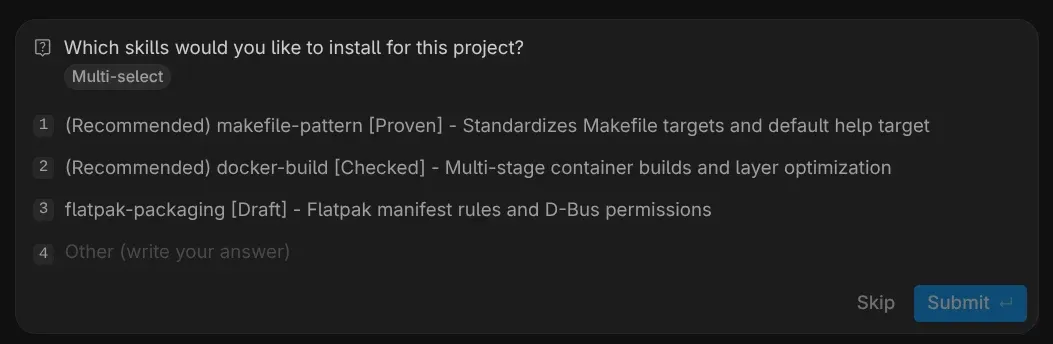 An example interactive multi-select question
2. Proceed Plan Artifacts (skills_installation_plan.md)
For larger workspace updates or memory distillations, the plugin writes a structured Markdown artifact to <appDataDir>/brain/<conversation-id>/ with RequestFeedback: true:
# Skill Installation Plan

| Skill ID | Trust Badge | Description | Target Path | Git Strategy |
| :--- | :--- | :--- | :--- | :--- |
| `makefile-pattern` | **Proven** | Makefile standards | `.agents/skills/makefile-pattern/` | Git Exclude |
| `docker-build` | **Checked** | Multi-stage Docker | `.agents/skills/docker-build/` | Committed |
Design Rationale (Local Git Exclude vs. Committed Skills)
When users install skills into a workspace (
.agents/skills/<name>/SKILL.md), some skills represent team-wide procedures (which should be committed to Git), while others represent personal developer preferences. To prevent polluting team repositories with personal workflow rules, installer scripts support--ignore, which appends entries to.git/info/excluderather than dirtying.gitignore.
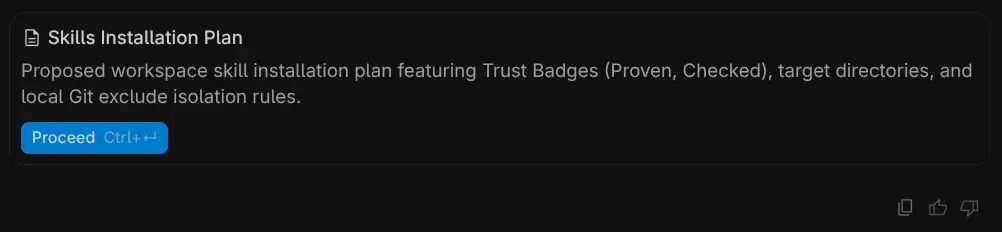
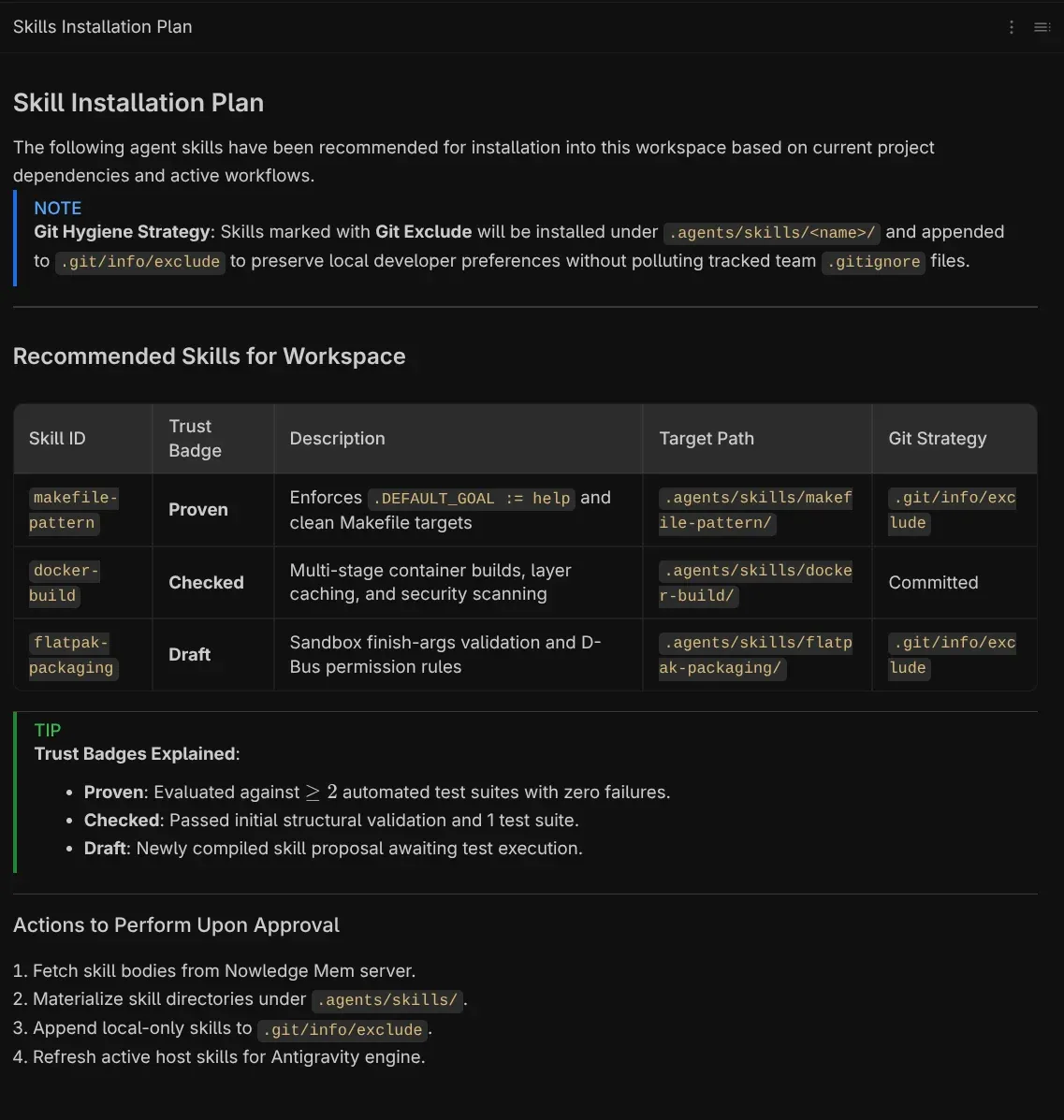 Draft plan with proceed button
5. In Practice: Dynamic Skill Loading (/nmem-skill-load)
Here is how on-demand skill discovery works in practice during a real task:
- Ephemeral Mode (Zero-Restart): Ingests the fetched
SKILL.mdbody directly into the active turn context as a structured context block (<skill_instruction>). This allows Antigravity to follow specialized instructions immediately for the current task without writing files to disk or requiring workspace restarts. - Persistent Mode: Writes the skill to
.agents/skills/<name>/SKILL.mdand appends.agents/skills/<name>/to.git/info/excludeif the user prefers local-only isolation.
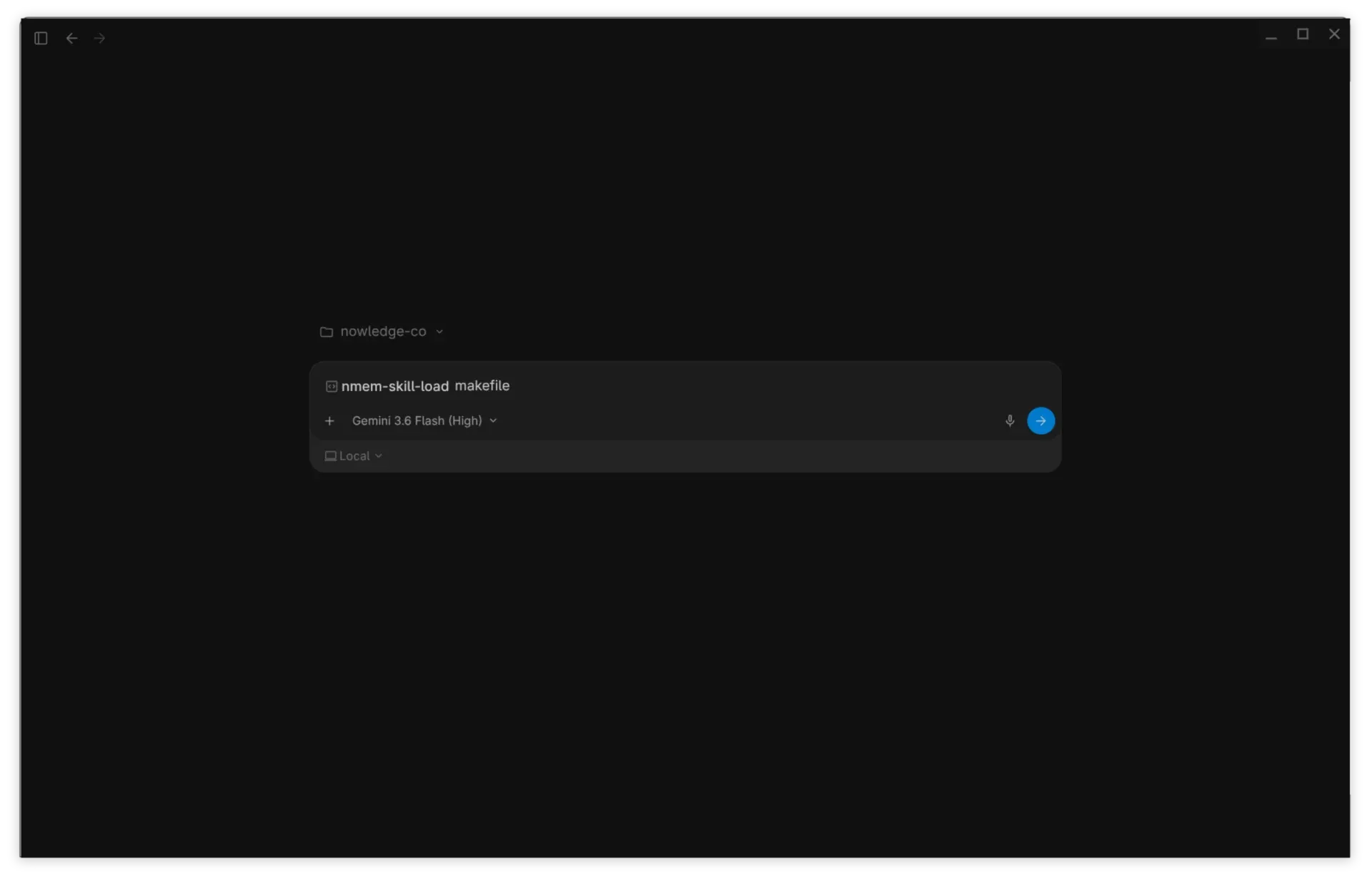
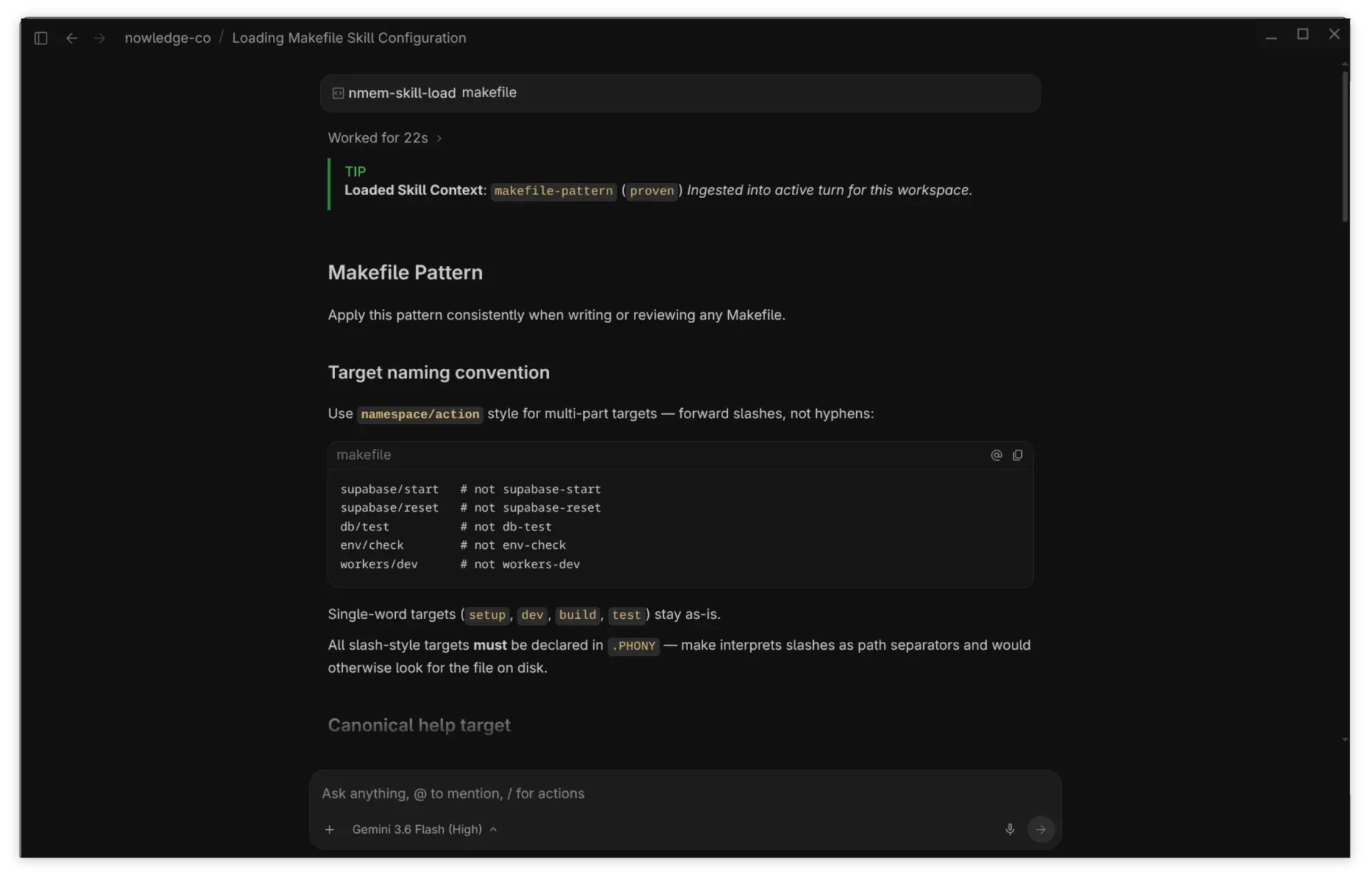
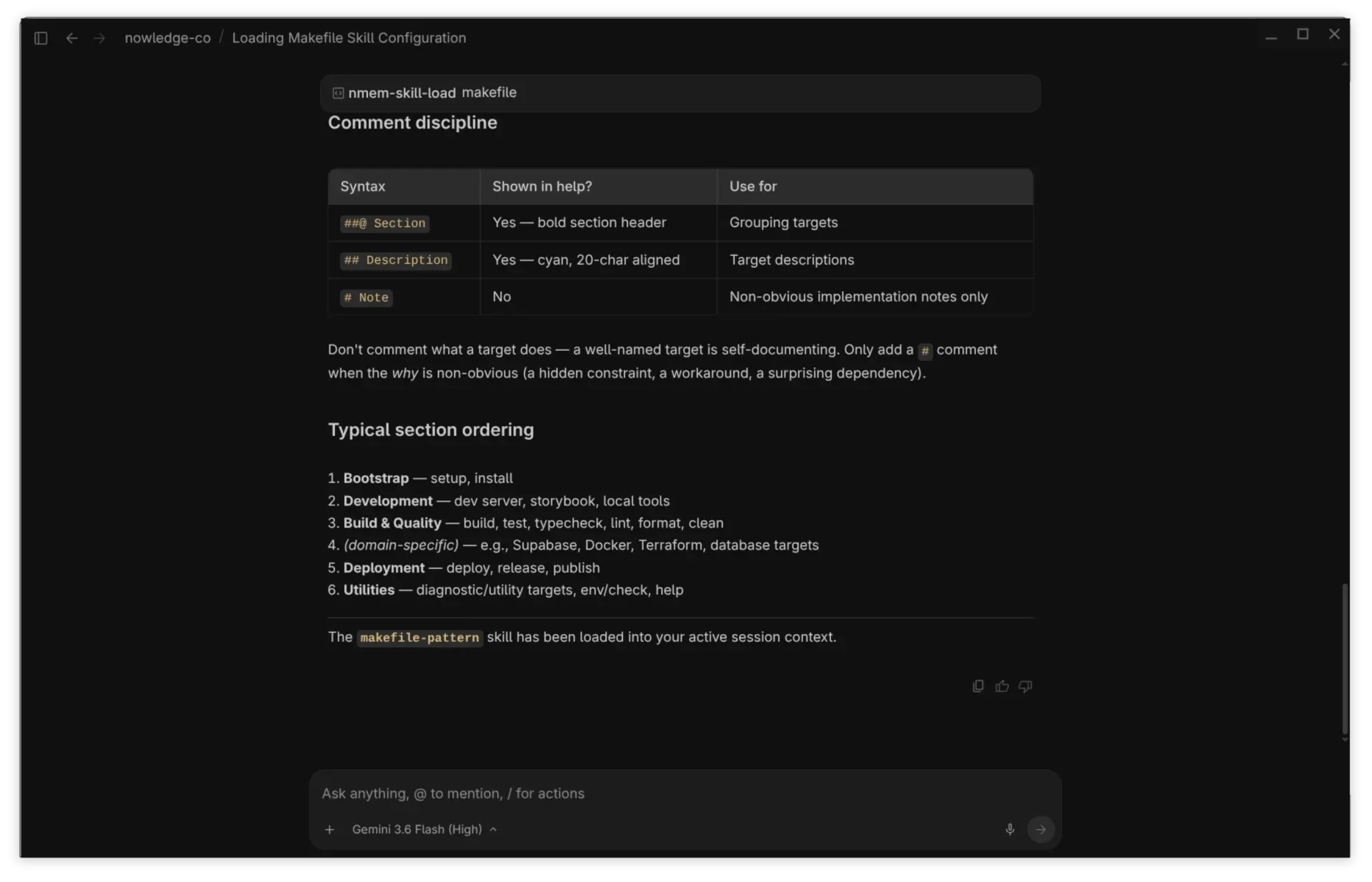 Dynamic injection of a custom Makefile skill into a new session
Conclusion & Getting Started
By combining Google Antigravity 2.0’s plugin hooks with Nowledge Mem’s hybrid transport and rich UI interfaces, we created a knowledge integration that is fast, resilient, and developer-centric.
Quick Setup
Install the Plugin:
mkdir -p ~/.gemini/config/plugins/nowledge-mem
curl -sSL https://github.com/nowledge-co/nowledge-mem-google-antigravity/releases/latest/download/nowledge-mem-google-antigravity.tar.gz \
  | tar -xz -C ~/.gemini/config/plugins/nowledge-mem
Verify Connection: Restart Antigravity and run /nmem-status or check nmem status.
Explore Knowledge: Use /nmem-memory-search, /nmem-skill-manage, or /nmem-skill-load <query> to bring your personal knowledge base into your coding workflow.
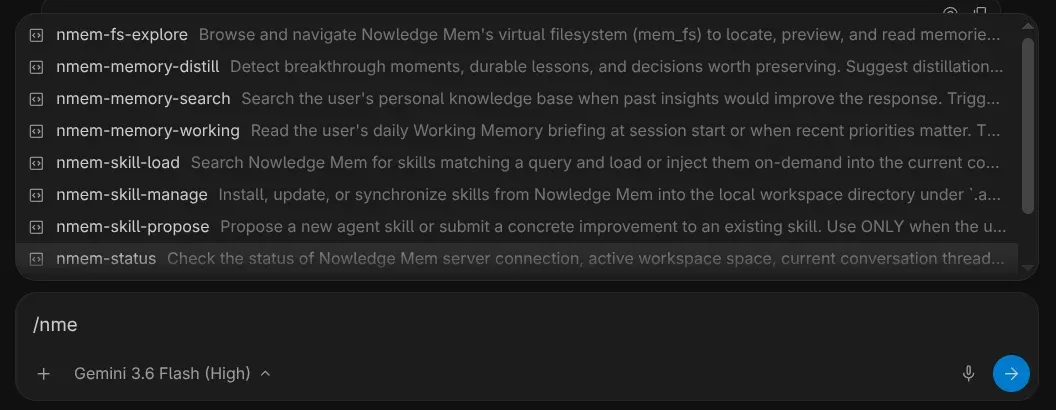 Global plugin skills available in any Antigravity conversation
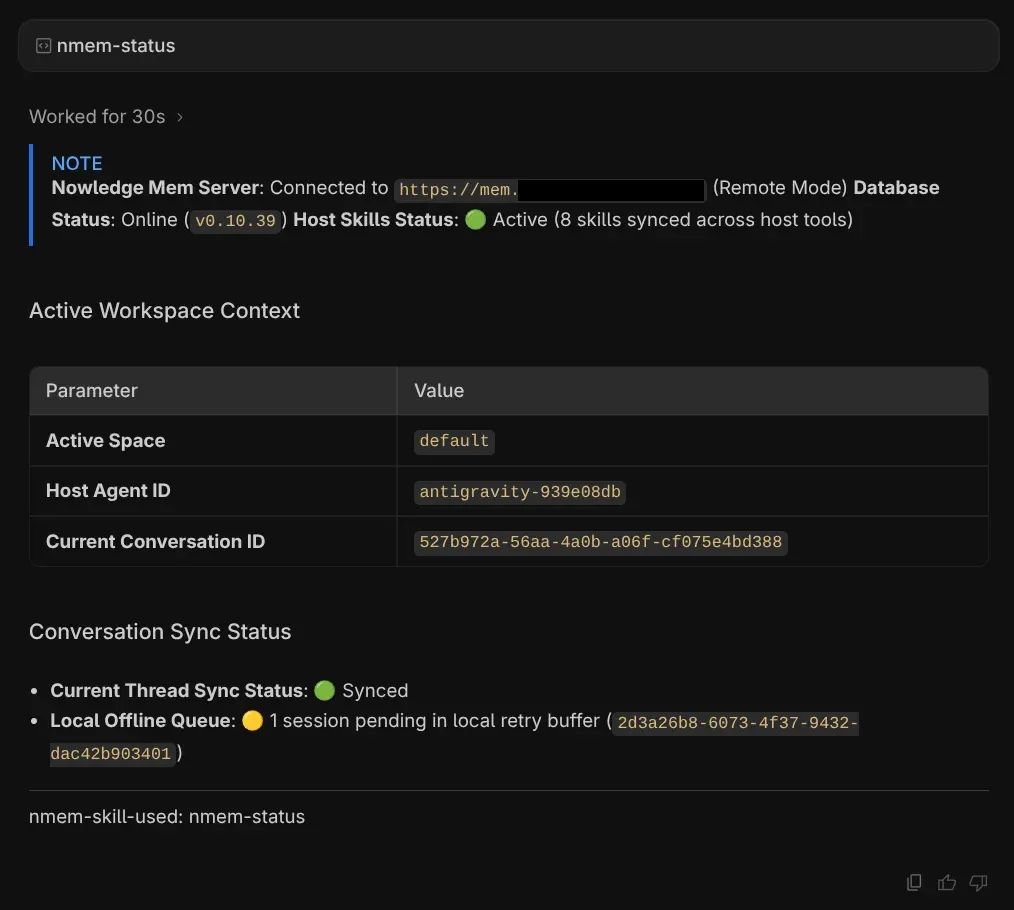 Once installed, you can use /nmem-status to check if everything configured and working properly
There you have it; your personal context, engineering knowledge and rules all seamlessly integrated into your agentic development workflow and constantly growing the more you use it.